Skip to content
Back to Blog

Google Business Profile 2026: Photos as Local SEO Tool

What Google's own ranking guide says about Business Profile photos, five myths to skip, and a photographer's shot list for a profile people choose.

Most advice about Google Business Profile photos promises that better pictures will push you up the map. Google's own help page on local ranking doesn't say that. It names three factors, relevance, distance and prominence, and photos aren't one of them.

That doesn't make photos unimportant. It changes what they're for. Your profile photos don't get you into the local results. They decide what happens once you're there, when someone looks at your listing next to two competitors and picks one to call. I photograph offices, teams and work in progress for a living, so this post covers both sides: what Google actually says about photos in 2026, and how to make the ones on your profile good enough to be the business people choose.

What Google says decides local ranking

Google's help article Improve your local ranking on Google lists three factors:

  • Relevance: how well your profile matches what someone searched for.
  • Distance: how far your business is from the person searching, or from the place they named in the search.
  • Prominence: how well known your business is. Google says this draws on information such as how many websites link to you and how many reviews you have, and that more reviews and positive ratings can help.
  • The same article does suggest adding photos, but it presents them as a way to show customers your business, not as a ranking input. So the levers Google names for ranking are a complete, accurate profile and a steady flow of genuine reviews. Photos are how you persuade the person reading the listing.

    Five photo myths worth ignoring

    Geotagging your photos helps you rank. It doesn't. Joy Hawkins at Sterling Sky and Tim Kahlert at Hypetrix each ran controlled tests and found no ranking change from geotagged uploads, and Whitespark's 2024 write-up notes that practitioners in its survey ranked geotagging as the top local search myth. The location data in a photo is widely reported to be stripped on upload, so there is nothing left for Google to read.

    Descriptive file names help your profile photos rank. No Google documentation says so. File names matter for images on your own website, where Google reads the page around them. A photo uploaded to your profile goes through a different process, so name files in whatever way keeps you organized.

    Profiles with at least ten photos get priority. The number circulates widely, and I haven't found a Google source for it. Upload as many good photos as it takes to show your business accurately, with no filler added to hit a count.

    Google's AI grades your photos and ranks you on them. Google now uses Gemini in Maps for features such as suggested photo captions and conversational search, but it hasn't said that it scores business photos for ranking. If someone claims to know how Google weighs your photos, ask them for the source.

    Businesses with photos get 42% more direction requests. This figure comes from an older Google-cited study and still appears in marketing decks, but it isn't on Google's current help pages. Even where it held, it described a very different search results page from the one your customers see today.

    What good photos actually do for you

    When your listing appears in the map results, it sits next to other businesses offering the same service. People compare the photos, the rating and the first few reviews, and then they pick. A clear photo of a real reception area, real people and real work answers the questions they're asking: whether this is a legitimate business, whether it's the kind of place they want, and whether the people there look like they know what they're doing.

    A few things about how Google shows photos are worth knowing before you shoot anything.

  • Your cover photo is a request, not a guarantee. You can choose one, but Google doesn't promise it will be the first image searchers see, and business owners regularly find Google leading with a different photo, sometimes one a customer uploaded. Every photo on your profile should be one you'd be comfortable seeing first.
  • Customers can add photos too. You can't delete photos other people upload. You can report the ones that break Google's rules, such as photos that are irrelevant, offensive or show someone without their permission. The practical defense is a strong set of your own.
  • New uploads aren't instant. Google says new photos and videos can take 24 to 48 hours to appear.
  • The shot list

    Google sorts business photos into categories such as exterior, interior, product, at work and team, alongside your logo and cover photo. Here is what I'd photograph for each one at a typical office-based business.

    Exterior

    Photograph the building the way a first-time visitor approaches it, with the entrance and signage easy to read. If you share a building, add the suite entrance or the lobby directory too. Shoot on a bright overcast day, or with the sun behind you, so the front of the building isn't in shadow. If you're a service-area business that works at clients' locations and has no public address, skip this category and put the effort into at-work photos.

    Interior

    Show the spaces a client will actually see: reception, a meeting room and the area where the work happens. Turn on every light, open the blinds, and move bags, cables and stacks of paper out of the frame. Shoot from chest height with the camera held level so walls and door frames stay straight. A tilted phone makes a room look like it's leaning, and it's the most common problem I see on office profiles.

    At work

    This is the category most businesses leave empty, and it's often the most persuasive one. Photograph real work in progress: a consultation, hands on a keyboard or a tool, a technician on a job site, a team working through a problem at a whiteboard. Candid photos are fine as long as they're well lit and everyone in them has agreed to be photographed.

    Team

    Use professional headshots that match each other, with the same background, lighting and crop, so the team looks like one company. Add one or two photos of the team together. A matched set also makes it easy to add new hires later without the page looking patched together, which is the same reason I shoot team headshots for websites to a written standard.

    Products and finished work

    Show what you deliver. For a contractor that means finished projects. For a medical or dental practice it might be a treatment room. For a manufacturer it's the product on a clean background or in use.

    Logo and cover

    Upload a clean, square logo file rather than a photo of your sign. For the cover, choose a horizontal image with the subject near the middle, because Google crops it differently on phones and computers.

    Need professional photos for your Google Business Profile?

    Team headshots, office interiors, and work in progress, planned in one session for your profile and your website.

    Get a Quote

    Google's rules that get photos rejected or removed

    Google's guidelines for Business Profile photos are short, and most rejected photos break one of them.

  • Format and size: JPG or PNG, between 10 KB and 5 MB. Google recommends at least 720 by 720 pixels and sets the minimum at 250 by 250. Export professional files at a sensible size rather than uploading full-resolution originals.
  • Quality: Google asks for photos that are in focus and well lit, with no significant alterations or excessive filters. Normal color correction and retouching are fine. Heavy presets and replaced skies are not.
  • Real, not borrowed: Google's content policy asks that contributions accurately represent the place. Stock images, screenshots and collages don't show your business, and they're the first thing I'd remove from any profile.
  • People: don't post photos of identifiable people without their permission. Google's policy treats someone's face posted without consent as personal information it can take down.
  • Advertising: Google's policy says not to post content for advertising or solicitation. Keep prices, promotions and slogans out of your photos and put offers in a post instead.
  • Video: up to 30 seconds, up to 75 MB, at 720p or higher.
  • One thing not to confuse: if Google asks you to verify your business with a video, that's a separate process with its own rules. A verification video has to be an unedited recording made on your phone through your Business Profile, so a polished promotional clip won't work there.

    Keeping it current

    A profile that was set up once and left alone slowly drifts out of date: a former employee in the team photos, the old logo on the door, a lobby that has since been renovated. Customers notice, especially when they arrive and the place doesn't match what they saw.

    Add photos when something real changes. When you hire someone, add their headshot. When you finish a project you're proud of, add it. When you renovate, upload the new space and delete the old interior photos. The Add update button on your profile, shown below, lets you pair a photo with a short post, which shows people the business is active without inventing reasons to post.

    A photo or update every month or so is a sensible rhythm for most businesses, and one well-planned shoot can supply several months of it. Set aside a handful of frames from the session, such as a detail of your space, a candid team moment and a finished piece of work, and add them one at a time.
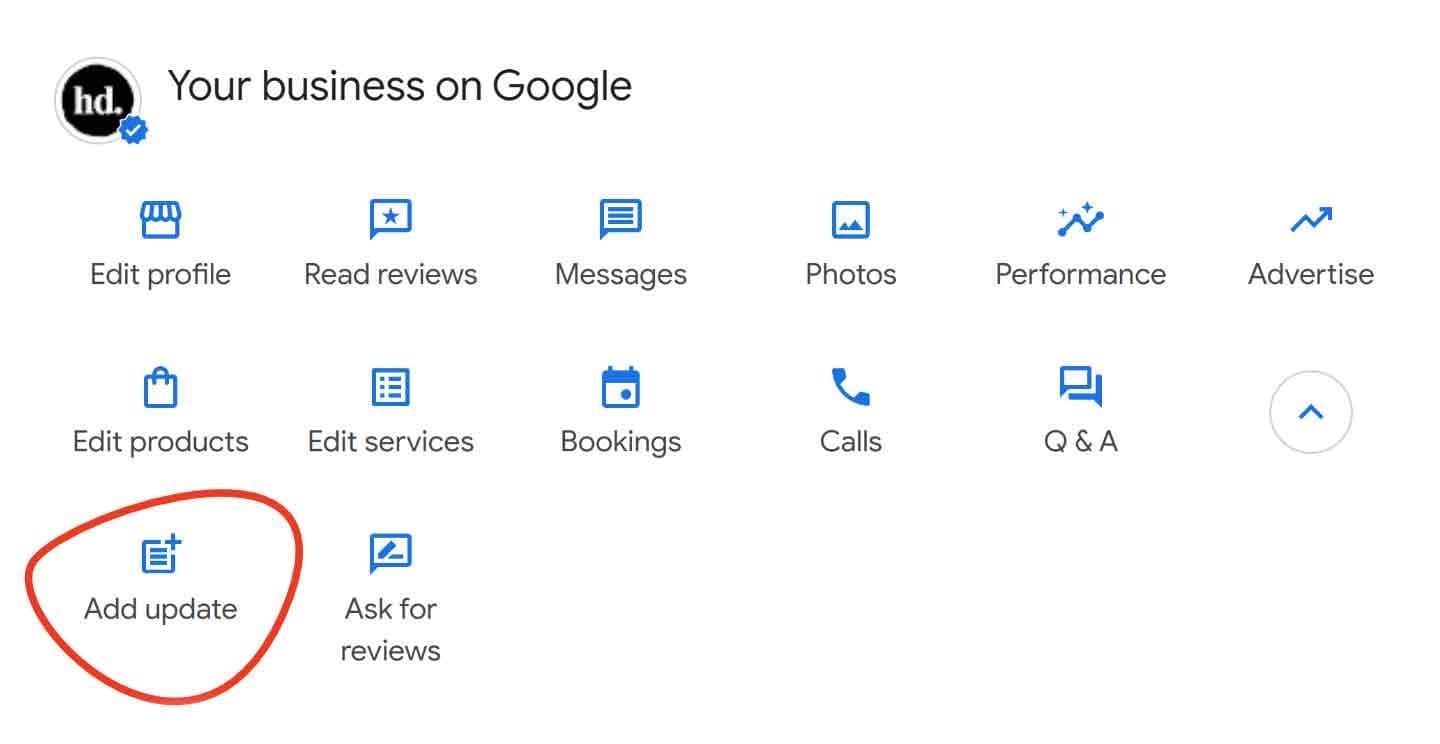
    Google Business Profile dashboard for Henry David Photography with the Add update button circled in red

    How to tell whether it's working

    Your profile has a Performance section that shows calls, website clicks, direction requests and, where they apply, bookings and messages. Write down those numbers for the three months before you replace your photos, then compare them with the three months after. Pay most attention to the actions people take. If views stay about the same while calls and website clicks go up, the profile is persuading more of the people who find it.

    Be fair to the comparison. Seasons, new reviews and changes to Google's results pages all move these numbers too, so treat one month as a hint and a full quarter as evidence.

    The short version

    Keep your profile complete and accurate, earn genuine reviews, and fill every photo category with current photos that show your real space, your real team and your real work. Google's ranking factors get you seen, and the photos are what people judge you on once they see you.

    When I photograph a team or an office in St. Louis, the same session can cover most of the categories above: matched headshots, interiors, work in progress and the building itself. If you'd like that set planned around your profile and your website at the same time, see facility photography and corporate lifestyle photography, or get in touch.

    Topics

    google business profile photosgoogle business profile photo guidelineslocal seo photographygoogle business photosgbp photo tips 2026geotagging photos mythprofessional photos google businessgoogle maps business photos

    Questions

    Do photos help my Google Business Profile rank higher?▼
    Not directly, as far as Google has said. Google's help article on local ranking names three factors: relevance, meaning how well your profile matches the search; distance from the person searching; and prominence, which Google ties to things like how many websites link to you and how many reviews you have. Photos aren't listed as a ranking factor, and the same article presents them as a way to show customers your business. Where photos matter is after you appear. Your listing sits next to competitors in the map results, and people compare photos, ratings and reviews before deciding who to call. Clear, current photos of your real space, team and work make that decision easier in your favor. The useful approach is to handle ranking through complete, accurate profile information and genuine reviews, and to treat photos as the part of the profile that persuades the people who find you.
    Does geotagging photos help Google Business Profile rankings?▼
    No. Geotagging, which means adding GPS coordinates to a photo's file data before uploading it, is one of the most repeated tips in local SEO and one of the most thoroughly tested. Joy Hawkins at Sterling Sky and Tim Kahlert at Hypetrix each ran controlled tests on real Business Profiles and found no measurable ranking change from geotagged uploads. Whitespark reported in 2024 that practitioners in its survey ranked geotagging as the number one local search myth. The location data in a photo is also widely reported to be stripped when you upload it, so there is nothing left for Google to read. Google hasn't published any statement saying geotags matter. Your time is better spent on the things Google does name, such as complete profile information and genuine reviews, and on taking photos that are sharp, well lit and accurate, because those are what persuade the people comparing you with other businesses.
    What kinds of photos should I upload to my Google Business Profile?▼
    Cover each category Google offers with real photos of your business. Exterior photos should show the entrance and signage the way a first-time visitor approaches it, unless you're a service-area business with no public location. Interior photos should show the spaces clients actually see, such as reception, a meeting room and the work area, with the lights on and clutter cleared. At-work photos show real work in progress and are the category most businesses leave empty. Team photos should be matching professional headshots plus one or two of the group together. Product or finished-work photos show what you deliver. Add a clean, square logo file and choose a horizontal cover photo with the subject near the middle. Keep in mind that Google doesn't guarantee your cover photo is the first image people see, so every photo on the profile should be one you'd be comfortable seeing first. Skip stock images, screenshots and collages entirely.
    How often should I add new photos to my Google Business Profile?▼
    Add photos whenever something real changes, and aim for roughly one new photo or update a month. Good reasons include a new hire's headshot, a finished project, a renovated space or a new product. When you add new interior or team photos, delete the ones they replace, because a former employee or an old lobby on your profile confuses customers who arrive expecting what they saw. The Add update button on your profile lets you pair a photo with a short post, which shows people the business is active. You don't need a separate shoot every month to keep that pace. One well-planned session can supply several months of material if you set aside a handful of frames, such as a detail of your space, a candid team moment and a finished piece of work, and add them one at a time. The goal is a profile that stays accurate and shows a business that is open, active and cared for.
    What are Google's size and quality requirements for Business Profile photos?▼
    Google's help page for Business Profile photos sets out the requirements. Photos must be JPG or PNG files between 10 KB and 5 MB. Google recommends a resolution of at least 720 by 720 pixels and sets the minimum at 250 by 250 pixels. It asks for photos that are in focus and well lit, with no significant alterations or excessive use of filters, so normal color correction and retouching are fine but heavy presets are not. Videos can be up to 30 seconds long and up to 75 MB, at 720p resolution or higher. Beyond the technical specs, Google's content policy asks that photos accurately represent the place, that identifiable people only appear with their permission, and that photos aren't used for advertising. Google also notes that new photos and videos can take 24 to 48 hours to appear on your profile. If a professional photographer delivers large files, export copies under 5 MB for uploading rather than sending the originals.

    About the author

    Henry David

    Henry David is a corporate photographer based in St. Louis, serving teams and organizations across the US. Real client work includes Merrill Lynch, Northwestern Mutual, Washington University Medicine, KPMG, Boeing, Belden, RubinBrown, Wiegmann Associates, and Heartland Dental. Combining photography, video, and AI-search-aware page architecture in one engagement is the work of Henry David Photography.

    Ready to upgrade your Google Business Profile photos?

    We're happy to discuss anything covered in this article, or your specific photography and video needs.

    Get a Quote