Most advice about Google Business Profile photos promises that better pictures will push you up the map. Google's own help page on local ranking doesn't say that. It names three factors, relevance, distance and prominence, and photos aren't one of them.
That doesn't make photos unimportant. It changes what they're for. Your profile photos don't get you into the local results. They decide what happens once you're there, when someone looks at your listing next to two competitors and picks one to call. I photograph offices, teams and work in progress for a living, so this post covers both sides: what Google actually says about photos in 2026, and how to make the ones on your profile good enough to be the business people choose.
What Google says decides local ranking
Google's help article Improve your local ranking on Google lists three factors:
The same article does suggest adding photos, but it presents them as a way to show customers your business, not as a ranking input. So the levers Google names for ranking are a complete, accurate profile and a steady flow of genuine reviews. Photos are how you persuade the person reading the listing.
Five photo myths worth ignoring
Geotagging your photos helps you rank. It doesn't. Joy Hawkins at Sterling Sky and Tim Kahlert at Hypetrix each ran controlled tests and found no ranking change from geotagged uploads, and Whitespark's 2024 write-up notes that practitioners in its survey ranked geotagging as the top local search myth. The location data in a photo is widely reported to be stripped on upload, so there is nothing left for Google to read.
Descriptive file names help your profile photos rank. No Google documentation says so. File names matter for images on your own website, where Google reads the page around them. A photo uploaded to your profile goes through a different process, so name files in whatever way keeps you organized.
Profiles with at least ten photos get priority. The number circulates widely, and I haven't found a Google source for it. Upload as many good photos as it takes to show your business accurately, with no filler added to hit a count.
Google's AI grades your photos and ranks you on them. Google now uses Gemini in Maps for features such as suggested photo captions and conversational search, but it hasn't said that it scores business photos for ranking. If someone claims to know how Google weighs your photos, ask them for the source.
Businesses with photos get 42% more direction requests. This figure comes from an older Google-cited study and still appears in marketing decks, but it isn't on Google's current help pages. Even where it held, it described a very different search results page from the one your customers see today.
What good photos actually do for you
When your listing appears in the map results, it sits next to other businesses offering the same service. People compare the photos, the rating and the first few reviews, and then they pick. A clear photo of a real reception area, real people and real work answers the questions they're asking: whether this is a legitimate business, whether it's the kind of place they want, and whether the people there look like they know what they're doing.
A few things about how Google shows photos are worth knowing before you shoot anything.
The shot list
Google sorts business photos into categories such as exterior, interior, product, at work and team, alongside your logo and cover photo. Here is what I'd photograph for each one at a typical office-based business.
Exterior
Photograph the building the way a first-time visitor approaches it, with the entrance and signage easy to read. If you share a building, add the suite entrance or the lobby directory too. Shoot on a bright overcast day, or with the sun behind you, so the front of the building isn't in shadow. If you're a service-area business that works at clients' locations and has no public address, skip this category and put the effort into at-work photos.
Interior
Show the spaces a client will actually see: reception, a meeting room and the area where the work happens. Turn on every light, open the blinds, and move bags, cables and stacks of paper out of the frame. Shoot from chest height with the camera held level so walls and door frames stay straight. A tilted phone makes a room look like it's leaning, and it's the most common problem I see on office profiles.
At work
This is the category most businesses leave empty, and it's often the most persuasive one. Photograph real work in progress: a consultation, hands on a keyboard or a tool, a technician on a job site, a team working through a problem at a whiteboard. Candid photos are fine as long as they're well lit and everyone in them has agreed to be photographed.
Team
Use professional headshots that match each other, with the same background, lighting and crop, so the team looks like one company. Add one or two photos of the team together. A matched set also makes it easy to add new hires later without the page looking patched together, which is the same reason I shoot team headshots for websites to a written standard.
Products and finished work
Show what you deliver. For a contractor that means finished projects. For a medical or dental practice it might be a treatment room. For a manufacturer it's the product on a clean background or in use.
Logo and cover
Upload a clean, square logo file rather than a photo of your sign. For the cover, choose a horizontal image with the subject near the middle, because Google crops it differently on phones and computers.
Need professional photos for your Google Business Profile?
Team headshots, office interiors, and work in progress, planned in one session for your profile and your website.
Get a QuoteGoogle's rules that get photos rejected or removed
Google's guidelines for Business Profile photos are short, and most rejected photos break one of them.
One thing not to confuse: if Google asks you to verify your business with a video, that's a separate process with its own rules. A verification video has to be an unedited recording made on your phone through your Business Profile, so a polished promotional clip won't work there.
Keeping it current
A profile that was set up once and left alone slowly drifts out of date: a former employee in the team photos, the old logo on the door, a lobby that has since been renovated. Customers notice, especially when they arrive and the place doesn't match what they saw.
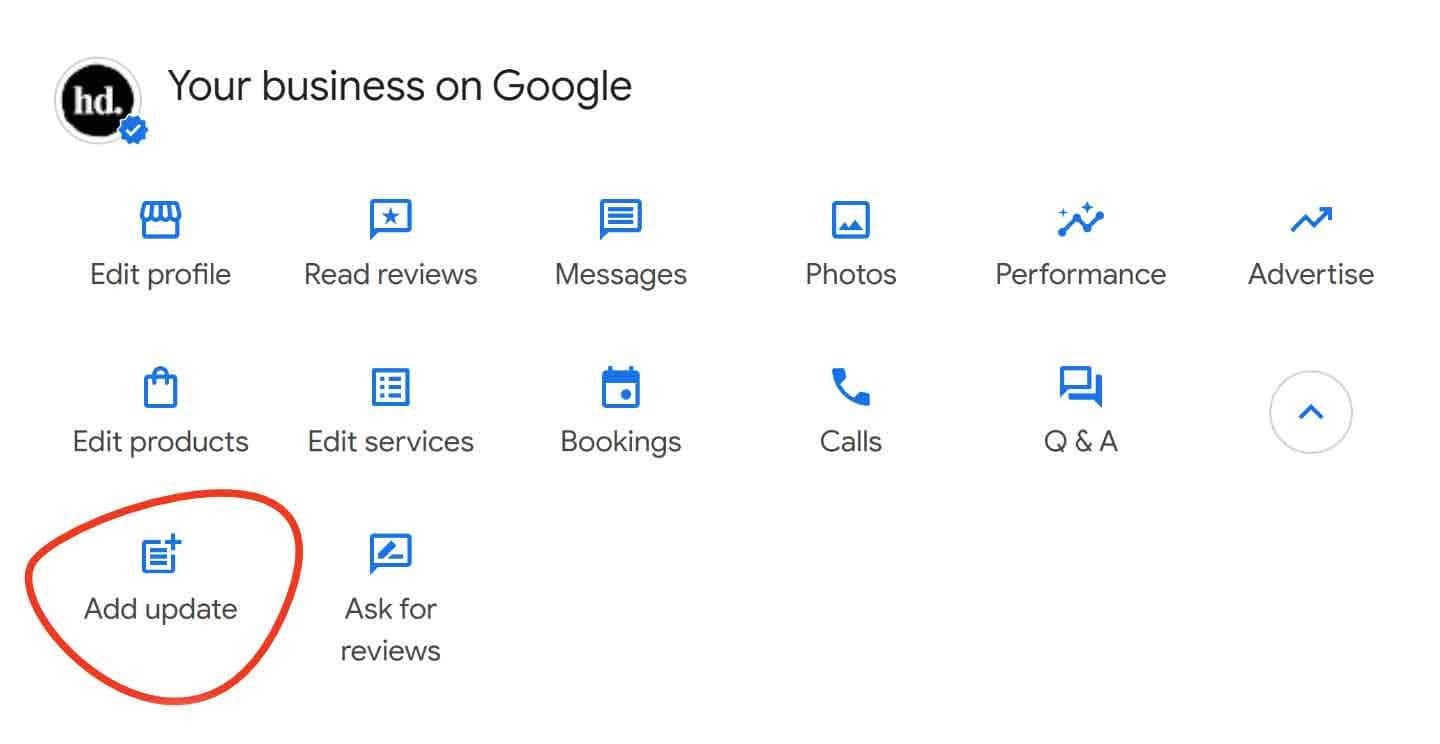
Add photos when something real changes. When you hire someone, add their headshot. When you finish a project you're proud of, add it. When you renovate, upload the new space and delete the old interior photos. The Add update button on your profile, shown below, lets you pair a photo with a short post, which shows people the business is active without inventing reasons to post.
A photo or update every month or so is a sensible rhythm for most businesses, and one well-planned shoot can supply several months of it. Set aside a handful of frames from the session, such as a detail of your space, a candid team moment and a finished piece of work, and add them one at a time.
How to tell whether it's working
Your profile has a Performance section that shows calls, website clicks, direction requests and, where they apply, bookings and messages. Write down those numbers for the three months before you replace your photos, then compare them with the three months after. Pay most attention to the actions people take. If views stay about the same while calls and website clicks go up, the profile is persuading more of the people who find it.
Be fair to the comparison. Seasons, new reviews and changes to Google's results pages all move these numbers too, so treat one month as a hint and a full quarter as evidence.
The short version
Keep your profile complete and accurate, earn genuine reviews, and fill every photo category with current photos that show your real space, your real team and your real work. Google's ranking factors get you seen, and the photos are what people judge you on once they see you.
When I photograph a team or an office in St. Louis, the same session can cover most of the categories above: matched headshots, interiors, work in progress and the building itself. If you'd like that set planned around your profile and your website at the same time, see facility photography and corporate lifestyle photography, or get in touch.