I cut a corporate testimonial last week the way I now cut almost every interview-driven project: I opened the raw footage in Descript, let it transcribe both camera angles, and started editing by deleting words from a document. Forty minutes in I had a 90-second rough cut that already had eye contact corrected, filler words stripped, and room tone evened out. I exported the timeline to Premiere for color, music, and graphics, and delivered the next day. That workflow used to be a two-day job. The piece of software that compressed it is Descript, and the feature that actually moved the needle is Underlord, their AI layer. I want to walk through where it earns its keep on real client testimonial work, where it still falls apart on deliverables, and exactly when I still open Premiere instead.
Text-Based Editing Is the Whole Pitch (And It Holds Up)
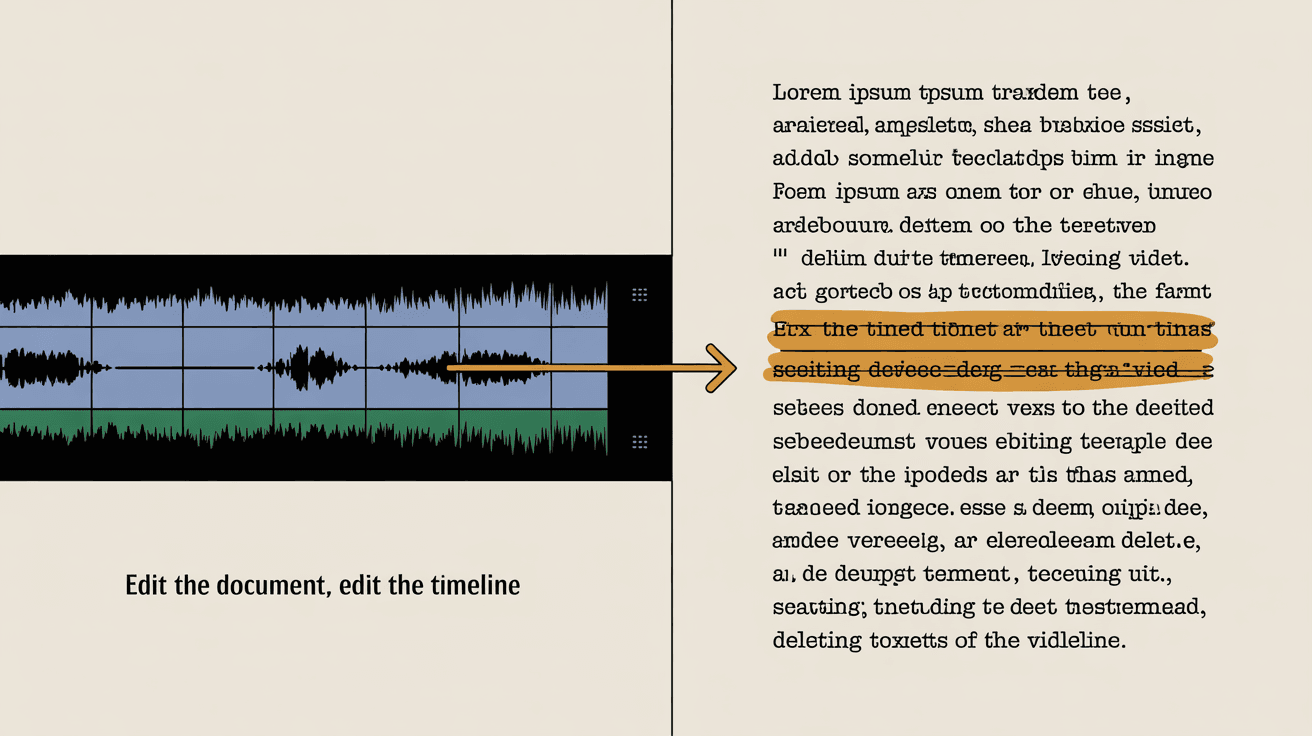
The core promise of Descript is simple: it transcribes your footage, you edit the transcript, and the timeline cuts itself. Delete a sentence in the document and the corresponding clip disappears. Highlight a paragraph and you've made a selection in the timeline.
For scripted narration this is a nice convenience. For client testimonials it is the entire ballgame. A testimonial interview is 45 minutes of a person trying to find the right way to say something, getting it wrong twice, restarting, then nailing it on the third try. Traditional NLE editing means scrubbing through audio waveforms, marking in and out points, and watching a lot of dead air. With text-based editing I read the transcript like a book, pull out the three takes that work, and stitch them together by selecting paragraphs.
The accuracy is good enough that I trust it for first pass. On a recent corporate testimonial for a financial services client, Descript's transcription got the speaker's industry jargon right on the first pass with maybe four manual corrections across a 35-minute session. Names of products and acronyms are still where it stumbles. Everything else is close to studio-grade.
Underlord: The AI Layer That Actually Helps
Underlord is Descript's umbrella term for their AI features. Three of them are genuinely useful for testimonial work. The rest I ignore.
Eye Contact correction is the one I pay for. When you film an interview off-axis (camera A on the subject's face, camera B over the interviewer's shoulder for cutaways), the wide-angle reads as the subject looking off-screen. That is fine for documentary work and wrong for a website testimonial where you want the speaker addressing the viewer. Underlord's eye contact tool synthesizes a corrected gaze that looks straight into the lens. On a healthcare interview I cut last quarter, this single feature saved me from a full reshoot when the subject's eyes had drifted toward the producer for half the answers. The result is not perfect on every frame, but it is convincing enough that no client has ever flagged it, and I always do a quick frame-by-frame review and disable it on any shot where the synthesis breaks.
Filler word removal does what the name says. It scans the transcript for ums, uhs, you-knows, and likes, and lets you delete them in one click. On a 45-minute interview that is hundreds of micro-cuts that would have taken me an hour to do manually. Descript does it in 30 seconds. The catch: it sometimes removes filler words that were carrying real timing, and the resulting cut sounds rushed. I always review every removal before committing.
Studio Sound cleans up audio. It is essentially a one-button denoiser plus a presence boost. For interviews I shot in a noisy office, it pulls the speaker forward and pushes HVAC hum into the background without that obvious processed sound. For interviews I already shot well with a lavalier in a treated room, I leave it off because it adds a slight artificial quality I do not want. Use it where you need it, skip it where you do not.
Where Descript Saves Real Time vs Premiere
Three concrete places where Descript turns hours into minutes for testimonial work.
Selecting takes. Reading a transcript is faster than scrubbing audio. For a 30-minute interview with three usable answers per question, I can pick my selects in 15 minutes in Descript. The same job in Premiere with markers takes 45.
Trimming filler and pauses. One pass with Underlord plus a manual review beats the old workflow of zooming in on every breath in the waveform.
Multi-cam interviews. Descript handles two-camera testimonial setups by syncing audio and letting you swap angles by clicking the speaker's name in the transcript. No more rolling through both timelines and matching cuts manually.
Remote review with clients. Descript has shareable web links where the client sees the current cut and can comment on specific words in the transcript. I send a link, the marketing director reviews on her phone during her commute, and her feedback comes back as text-anchored notes instead of timecode emails. That alone has cut a full revision round out of most of my video production projects.
Where Descript Falls Apart for Client Deliverables
This is the honest section. Descript is a fantastic editor and a mediocre finisher. The places it breaks down on professional client work:
Color grading. Descript's color tools are basic. For testimonial work where the subject is on a branded background and I need to match skin tones across two cameras, I export to Premiere and grade in Lumetri or use Dehancer for film emulation. Descript cannot match Premiere's scopes, secondary corrections, or LUT pipeline.
Motion graphics and lower thirds. Descript has templates. They look like templates. For a corporate client who paid for a custom brand kit, I build lower thirds in After Effects or Premiere using their actual fonts and brand colors. Descript's stock animations will get you flagged as cheap.
Audio mixing beyond cleanup. Studio Sound is a denoiser, not a mix. For a polished deliverable I still need a real audio session: compression, EQ, ducking music under dialogue, mastering to broadcast loudness standards. I do that in Premiere or Audition.
Final master output. Descript exports are fine for web. For broadcast, large-format display, or anything that needs ProRes 4444 with specific color metadata, I bounce the cut to Premiere first.
Complex multi-source projects. A testimonial that intercuts with B-roll, drone, screen recordings, and product footage gets messy in Descript fast. Once you have more than three or four media types on a timeline, the document metaphor stops being a help and starts being a constraint.
Need testimonial videos that sound like your clients, not like an ad?
I shoot, edit, and deliver corporate testimonials in St. Louis and across the Midwest. The full AI-Visual Branding Package wraps these video deliverables with the AI search setup that gets them surfaced.
See the packageHow Descript Fits Into the Rest of My Corporate Video Workflow
My current pipeline for a corporate testimonial looks like this:
1. Shoot with two cameras, lavalier and shotgun audio, minimum two-light setup. The same setup I use whether the subject is a CEO or a frontline employee.
2. Ingest into Descript first. Let it transcribe overnight if the interview is long.
3. Cut the rough in Descript: pick selects, trim filler, run eye contact where the subject was off-axis, apply Studio Sound only where the room was loud.
4. Send a Descript share link to the client for first-round review. Get text-anchored comments back.
5. Revise in Descript based on client feedback. This is where the text-based workflow saves me an entire day per project, because revision rounds are now five-minute edits instead of full re-cuts.
6. Export to Premiere for color, audio mix, music, lower thirds, and final master.
7. Deliver in the formats the client needs: 16:9 for web, 9:16 vertical for social, 1:1 square for LinkedIn feed, plus stills pulled from the master.
For projects that involve cinematic B-roll (which most of my corporate video work does) the shooting side still lives in the camera. If you are filming testimonials on iPhone for budget reasons, my iPhone Cinematic Mode breakdown covers the actual depth and frame-rate trade-offs you need to know before you commit.
Honest Verdict: Descript vs Premiere
Descript is not a Premiere replacement. It is a Premiere accelerator. For testimonial-driven work it has earned a permanent slot in my pipeline because text-based editing is genuinely faster than waveform editing for interviews, and Underlord's eye contact and filler removal solve two problems that used to eat hours.
For anything that lives or dies on color, motion graphics, or audio mixing, Premiere still does the job better. The good news is that the two tools play nicely together. Cut in Descript, finish in Premiere. The bad news is that the round-trip is not as clean as Adobe-to-Adobe, and you will lose some metadata in the handoff. I have learned to lock my edit in Descript completely before exporting, because going back to fix a single line is a pain once the project lives in Premiere.
If you are a solo videographer or a marketing team cutting your own testimonials and you do not need broadcast-grade color or custom motion graphics, Descript alone might be enough. Export straight from Descript to MP4 and ship. For agency-grade or enterprise corporate work where every frame is going to get scrutinized by brand and legal, you still need Premiere or Resolve at the back of the pipeline.
When to Use Descript vs Premiere: A Shortcut
Use Descript alone when:
Use Descript then Premiere when:
Skip Descript entirely when:
What to Do Today
If you have a stack of testimonial footage sitting on a drive and you have been putting off the edit, the move is to download Descript's free trial, drag in one interview, and try the text-based workflow on a single project. You will know within an hour whether it fits the way you think.
If you are a corporate marketing or comms lead who needs testimonials produced and edited (not DIY), that is the work I do. I shoot the interview properly so the editor (whether that is me or your team) has clean inputs to work with. Bad audio and off-axis eye lines are problems Descript can patch. Bad lighting and a noisy location are problems no amount of AI is going to fix in post.
Ready to talk through a testimonial project? Get in touch and we'll talk it through. If you want to see how the rest of my video production process works end to end, the services page has the full breakdown.